• Tag-based Interaction System

WHAT I WORKED ON

Role:

Systems Programmer

Language:

C++

Engine:

Unreal Engine 5

Team Size:

9

Project Duration:

4 weeks

Lymbo

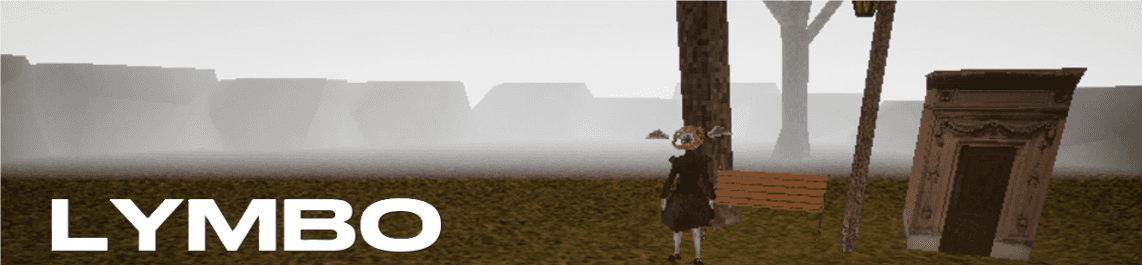
  • Lymbo is a third-person story-driven adventure game where the player, stuck in limbo, should complete a set of quests so that they can move on to the afterlife.


  • Gameplay consists of moving around, jumping, talking to NPCs with different dialogue options and interacting with different objects in the world.


OVERVIEW

INTERACTION SYSTEM

  • This was the second time I worked on an interaction system in a team project. I wanted to implement it a bit differently as I wanted the system to be a bit more flexible this time around.


  • I leveraged UE5's Gameplay Tags for this purpose. I mapped interaction logic(which were blueprints or C++ code), to Gameplay Tags in a TMap which is part of Subsystem. The same Gameplay Tags would be stored in interactable objects in the world.


  • There would be a middleman script called the Interaction Base Class, which would perform checks before the player starts interacting, and if the checks are successful, it would "set up" the interaction:


(C++) Interaction Base Class

bool UInteractionBase::TryInteraction_Implementation(
	AController* SomeSourceController,
	const TScriptInterface<IInteractor_Interface>& SomeSourceInteractor,
	const TScriptInterface<IInteractable_Interface>& SomeTargetInteractable)
{
	bool InteractionPossible = false;

	//checks if interactor can interact with the interactable
	InteractionPossible = SomeTargetInteractable->CanInteract(SomeSourceController); 
		
	if (InteractionPossible)
	{
		//sets up interaction
		CurrentInteractableTarget = SomeTargetInteractable;
		CurrentSourceController = SomeSourceController;
		CurrentSourceInteractor = SomeSourceInteractor;
		IInteractable_Interface::Execute_SetInteractionContext(
			CurrentInteractableTarget.GetObject(), this);
	}
	
	return InteractionPossible;
}

void UInteractionBase::BeginInteraction_Implementation()
{
	IInteractor_Interface::Execute_BeginInteraction(CurrentSourceInteractor.GetObject());
	IInteractable_Interface::Execute_BeginInteraction(CurrentInteractableTarget.GetObject());
}

void UInteractionBase::EndInteraction_Implementation()
{
	IInteractor_Interface::Execute_EndInteraction(CurrentSourceInteractor.GetObject());
	IInteractable_Interface::Execute_EndInteraction(CurrentInteractableTarget.GetObject());

	CurrentSourceInteractor = nullptr;
	CurrentInteractableTarget = nullptr;
	CurrentSourceController = nullptr;
}
  • It is to be noted that the Blueprint or C++ Interaction Logic class is a subclass of the Interaction Base Class shown above. Therefore, every Interaction Logic Blueprint created for the game would have the default "handshake" logic written above.


  • The Interaction Component on the player(or any other actor in the world) would grab the tag from the interactable, use that tag to get the Interaction Logic Class(abstracted as Interaction Context) from the Subsystem, link itself to the context and continue with the interaction.


(C++) Interaction Logic

void UInteractionComponent::TryInteractingWithObject(AActor* ActorFound)
{
	if (ActorFound != nullptr && CurrentInteractionContext == nullptr)
	{
		UActorComponent* ActorInteractable =
			ActorFound->FindComponentByInterface(UInteractable_Interface::StaticClass());

		if (ActorInteractable != nullptr)
		{
			//Use the Gameplay Tag on the Interactable to pull the corresponding
			//Interaction Context from a Subsystem, and link self to that context
			FGameplayTag TagForInteractionContext =
			IInteractable_Interface::Execute_GetInteractionTag(ActorInteractable);

			if (TagForInteractionContext.IsValid())
			{
				UInteractionBase* InteractionContext = GetWorld()->GetGameInstance()->
													   GetSubsystem<UUniversalInteractionSubsystem>()->
													   GetInteraction(TagForInteractionContext);

				if (InteractionContext != nullptr)
				{
					if (IInteraction_Interface::Execute_TryInteraction(
						InteractionContext,
						Cast<APawn>(GetOwner())->GetController(),
						this,
						ActorInteractable))
					{
						CurrentInteractionContext = InteractionContext;
						CurrentInteractable = ActorInteractable;
						IInteraction_Interface::Execute_BeginInteraction(CurrentInteractionContext);
					}
				}
			}
		}
	}
}
  • This resulted in a flexible system which could be easily extended in Blueprints or C++ by designers or programmers. The logic for interactions were in self-contained Blueprint/C++ scripts that were decoupled from Actors participating in the interaction.


  • Designers and Programmers ended up using the system to make interactions such as teleporting the player to a location, picking up items, talking to NPCs, opening doors and more.


gaurdian.kiran@gmail.com

+46 769666977

Contact: